
The 8 Best ERP for General Contractors: Expert Guide
Last updated: November 2026
Choosing construction ERP software in the USA is harder than it looks, because a US general contractor's back office carries rules that generic business software was never built for. Federally funded jobs need certified payroll under the Davis-Bacon Act. Owners and lenders expect AIA G702/G703 pay applications. Crews may cross state lines, which means multi-state payroll, different prevailing wage rules, and different sales and use tax rates on the same month's work. On top of that, your auditor and your bonding company want a work-in-progress (WIP) schedule they can trust.
Many US contractors still stitch this together with QuickBooks, an older on-premise system, and a stack of spreadsheets. Construction ERP software replaces that patchwork with one system that connects job costing, billing, payroll data, and project management to your financial reporting. This guide compares eight construction ERP platforms used by US general contractors, from mid-sized firms to ENR Top 400 builders, so you can shortlist the ones that fit your size and type of work.
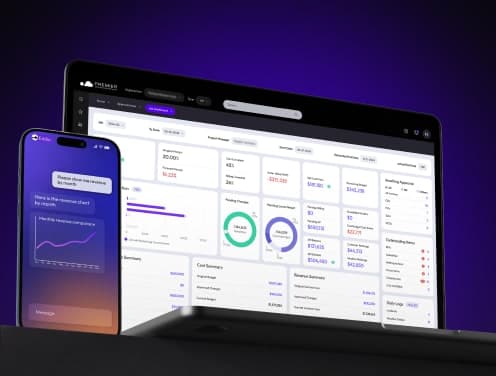
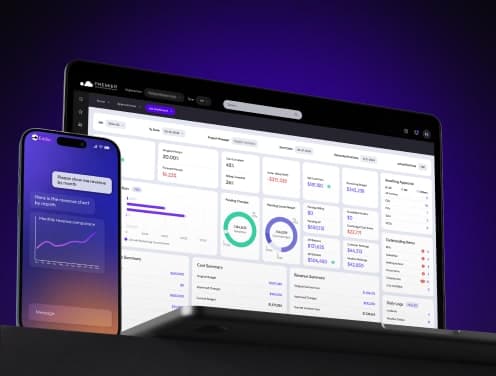
Discover why contractors across the US are switching to Premier.
Microsoft Dynamics 365 Business Central
Business Central is Microsoft's ERP for small and mid-sized businesses. On its own it is a general business system, so US contractors usually run it with a construction add-on from a Microsoft partner to get job costing, progress billing, and retainage. Microsoft reported more than 40,000 Business Central customers in 2024, and its biggest draw for construction firms is the connection to tools your team already uses every day.
Key Features
With a construction extension, Business Central combines job costing, project accounting, resource management, and subcontractor tracking in one system. Project managers can see costs across several job sites as they are posted, and Copilot, Microsoft's built-in AI assistant, can summarize cost changes and answer questions about your data in plain language.
The platform connects to Microsoft Teams, Outlook, and Excel without third-party middleware. A site supervisor can update progress through Teams, and the numbers flow into Power BI dashboards the office already uses. That cuts out the double entry that spreadsheet-based workflows create.
For US-specific requirements such as certified payroll reports, AIA-style progress billing, retainage, and change order management, check exactly which construction add-on your partner is proposing. These features come from the extension, not from standard Business Central, and the add-ons differ in depth.
Best For
This construction ERP works best for growing US contractors who already run on Microsoft 365 and need better financial visibility than QuickBooks gives them. Firms managing several projects at once, and companies that want to choose their own implementation partner, get the most value.
Business Central is available in the cloud and, through partners, on-premise, and it scales from small teams to companies with hundreds of users.
Pricing
US list pricing for Business Central is $80 per user per month for Essentials and $110 per user per month for Premium, billed annually, with lighter Team Members licenses at $8 per user per month. The construction add-on is licensed separately by the partner who sells it.
Implementation is where most of the cost sits. Depending on how much customization you need, partner implementations commonly run from roughly $25,000 for an out-of-the-box setup to well over $100,000 for a heavily tailored system. Ask every partner for a fixed-scope quote that includes data migration and training. Microsoft's own ROI studies are worth reading, but treat any vendor-funded figure as a best case.
Strengths & Considerations
Business Central is strong on financial reporting, multi-currency support, and cash flow forecasting, and its native Microsoft integrations save money compared with building custom connections on other construction ERP software.
The learning curve is steep for teams coming from simpler tools. User reviews often mention that the interface needs solid training, especially for staff new to full ERP systems, and that customizations frequently need a developer, which slows down changes that feel small.
Business Central does not include a native US payroll module, so you will need a third-party payroll integration, which matters if you run certified or union payroll. Licensing and implementation costs can also grow beyond the first quote when customizations pile up. For very large contractors with complex multi-entity, multi-state operations, a construction-native ERP may be a better fit.
SAP S/4HANA for Engineering & Construction
SAP built S/4HANA for companies whose operations have outgrown mid-market systems. In the US, it shows up mainly at large general contractors and engineering, procurement, and construction (EPC) firms running billion-dollar infrastructure, energy, and industrial programs across multiple states or countries.
Key Features
S/4HANA runs on SAP's HANA in-memory database, which processes large volumes of data quickly. Your finance team sees actual costs update as field crews log equipment use and material consumption, instead of waiting for overnight batch updates.
The platform connects jobsite operations to finance. Field teams update progress through mobile apps, and that data flows into project accounting, invoicing, and billing. This field-to-finance connection helps you track project costs accurately and spot budget overruns before they grow.
Procurement runs through supplier portals, automated contract awards, and digital invoicing that speed up payment cycles. Project controls, resource planning, and environmental health and safety tools are built in, and SAP's sustainability tools track carbon, energy use, and regulatory reporting for firms chasing green building or public-sector requirements.
For US public work, S/4HANA can be configured for prevailing wage compliance, AIA billing, and change order management, usually with help from an SAP partner that specializes in construction.
Best For
Large US general contractors and EPC firms get the most value from S/4HANA. It fits best when you coordinate many job sites, manage complex supply chains, or operate across several states and countries.
Contractors doing federal, state, and municipal infrastructure work benefit from its compliance tracking and audit trails. It also suits firms already on older SAP ECC systems that face SAP's end-of-support deadlines, though that migration needs careful planning around custom code and connections to BIM, CAD, and scheduling tools.
Strengths & Considerations
S/4HANA gives large contractors fast, detailed data for decision-making and connects estimating, procurement, execution, and financial close in one system. Its multi-currency and global compliance support make expansion beyond the US easier.
Implementation complexity is the biggest hurdle. Many contractors rely on custom workflows that do not fit SAP's standardized approach, and moving those into S/4HANA takes significant technical resources.
Data quality is the second risk. The system needs clean, structured master data, and many firms struggle with fragmented legacy systems. There is also a limited pool of US consultants who know both S/4HANA and construction.
The Public Cloud edition limits customization, since custom code has to run on SAP Business Technology Platform, and mandatory upgrades cannot be postponed. Plan for that if your operations cannot absorb change on SAP's schedule.
Premier Construction Software
Forbes Advisor recognized Premier Construction Software as Best Overall Construction Accounting Software for three consecutive years. This cloud-based construction ERP software runs on Microsoft Azure and serves general contractors, developers, homebuilders, and owners across the US and Canada who need full financial control without the cost and complexity of an enterprise ERP rollout.
Key Features
Premier connects accounting and project management in real time, giving you one system for job costing, WIP reporting, change orders, and cash flow forecasting. Your team stops entering the same data twice or hunting for numbers across disconnected tools.
The AI assistant, called Eddie, reviews your project data and flags risks before they hit profitability. Ask Eddie a question in plain language and you get an answer pulled from your actual job costs and project trends.
Guest portals connect architects, owners, and subcontractors to project workflows without extra licenses. Subcontractors can submit invoices directly into the system; one reviewer noted it takes about 45 seconds.
RFIs, subcontracts, drawings, and change orders tie directly to budgets and schedules. Automated billing and approvals speed up collections, time entry and labor cost tracking feed job costs from the field, and Premier connects to your payroll provider instead of forcing you to change how you run payroll. Multi-entity management gives you consolidated financials and WIP reporting across every company and project, which matters for US contractors running separate entities by state or line of business.
Premier's implementation team gets you operational in 60 days through ready-to-deploy templates and structured onboarding, far faster than the multi-month rollouts common with enterprise construction ERP software.
Best For
Premier fits US general contractors managing multi-project portfolios, owners coordinating several entities, and land developers tracking costs across developments. Around 75% of reviewers come from firms with 11 to 200 employees, which is the mid-market range where QuickBooks and spreadsheets usually stop keeping up.
Companies moving off QuickBooks, Sage 300, or spreadsheets see value quickly, as do teams frustrated by separate accounting and project management tools or poor visibility into job costs and cash flow.
Strengths & Considerations
Customer support earns 4.8 out of 5 stars from users, and reviewers point to billing and invoicing, multi-project management, and planning tools as top features. Premier was also named best value for money in the 2025 guide to best construction accounting software.
Client results show the impact. J. Corsi Developments reduced administrative time by 50% and reporting time by 25% after implementation. Max Construction saves more than 30 hours a week and improved project efficiency by 40%. Another contractor grew 30% year over year and saved $500,000 on a single project.
The upfront investment is real, though. Implementation starts at $15,000 on the Starter plan and $50,000 on Enterprise, and the Starter plan's $349 per user per month can add up as your team grows. Premier also does not include estimating, so you will keep your estimating tool alongside it.
Viewpoint Vista by Trimble
Viewpoint was founded in Portland, Oregon, and its Vista platform is now part of Trimble Construction One. Vista is one of the most widely used construction ERP systems among mid-sized and large US contractors, and for many of them it is the system of record that connects the back office to the field.
Key Features
Vista covers construction management from accounting through project closeout. Its job-cost accounting tracks every project stage. You can enter budgets manually or import them from estimating and project management tools, then drill into on-demand cost reports to keep jobs on budget.
Financial management includes accounts payable and receivable with automated tracking of due dates, discounts, and payment history. Cash management shows money coming in and going out, bank reconciliations are automated, and invoicing and payments run through the system to keep billing cycles moving.
Vista's HR and payroll features are one of its main draws for US contractors. They handle employee records, benefits, union and multi-state payroll, certified payroll, and tax filings, which reduces manual errors on the payroll rules US construction companies face. Equipment management tracks usage, maintenance, and cost, and materials management covers inventory and procurement.
Document management centralizes files with version control and secure access, and mobile tools connect field crews to the ERP so you can move away from paper.
Best For
Vista fits US contractors who need detailed project management, accounting, and payroll in one system, especially firms that outgrew QuickBooks or Sage. It is typically used by mid-sized to enterprise contractors in the $50 million to $1 billion-plus revenue range.
General contractors, civil, electrical, and mechanical contractors, and specialty trades all use it. Smaller contractors should look elsewhere, because setup is expensive and complex.
Strengths & Considerations
Users like how Vista ties financial data to actual project progress, which helps both accounting and project teams. Its integrated approach handles the complexity of medium and large contractors in one system, including the payroll depth many US firms need.
Implementation can be complex and slow. Many firms need help from Viewpoint partners or consultants, and the breadth of features means real training time.
Some users report that support quality has slipped, with longer wait times on tickets. Costs can climb for smaller firms when modules are bought separately, and some users note workflow friction in specific entry screens.
CMiC Construction ERP
CMiC has focused on construction ERP software since 1974, giving it five decades of industry depth that general business platforms cannot match. It is a common choice among ENR Top 400 contractors, the ranking of the largest US contractors by revenue.
Key Features
CMiC runs on a single database, which removes the data silos created by using several disconnected systems. Financial transactions flow into job costing with no import and export steps. That single database supports CMiC's two product pillars: Financials and Project Management.
The Financials pillar covers accounting, human capital management, payroll, inventory, and equipment. Job cost accounting handles union payroll with prevailing wage calculations, WIP reporting built for auditors and sureties, subcontract management with retention tracking, and AIA billing formats. Its certified payroll capabilities are a major reason US government contractors choose it.
CMiC Project Management connects bidding and procurement, construction documents, quality and safety, and project controls in one environment, and an open API lets you connect outside tools without middleware.
Best For
CMiC serves ENR Top 400 general contractors, federal and state government contractors who need certified payroll compliance, heavy civil and infrastructure firms with complex union payroll, and multi-entity construction companies that want combined financials. Contractors under about $50 million in annual revenue may find it overbuilt and overpriced.
Strengths & Considerations
CMiC delivers construction-specific depth that general ERPs cannot copy, and its single database keeps departments working from the same numbers.
Implementation is a major project, often a year or more with dedicated internal staff. Verified users rate ease of use lower than many competitors and describe a steep learning curve. Expect training to take weeks rather than days, plan for dedicated IT support, and budget for consulting on any customization.
Acumatica Construction Edition
Acumatica, based in Kirkland, Washington, runs entirely in the cloud and gives you secure access to project data from any device. Its Construction Edition combines job cost accounting, project management, payroll, CRM, and inventory without locking you into rigid workflows, and it is sold and implemented through a network of US resellers.
Key Features
Acumatica gives you immediate visibility into project budgets, actual costs, and forecasts. Your team can record, review, and approve scope changes that update budgets automatically. Project billing produces pro forma, progress, and time-and-material invoices from one screen, and daily field reports keep everyone looking at the same information.
Job costing captures labor, material, and equipment costs as they post and keeps project management and accounting in sync. Change orders handle back charges and reductions to vendor commitments, and budgets link directly to contracts and project plans, covering hard costs, soft costs, overhead, and fees.
Payroll ties labor costs to jobs and supports union rules and certified payroll for US public work. Document management tags and organizes RFIs, submittals, contracts, and photos, and the Project 360 dashboard shows the KPIs you choose.
Best For
Acumatica works for US general contractors, land developers, homebuilders, and subcontractors with roughly $5 million to $100 million in revenue. Companies adding divisions, expanding into new states, or needing better reporting for lenders and sureties benefit most.
Pricing
Acumatica prices by resources used and applications licensed rather than by named user, so adding users does not automatically raise your bill. Annual subscriptions for smaller companies start in the mid-four figures to low five figures, and mid-sized contractors commonly spend $25,000 or more a year. Implementation through a reseller often runs $60,000 to $100,000 or more.
Strengths & Considerations
Acumatica is strong on cost codes, job budgets, and change management, its interface is more modern than most legacy systems, and it scales to multi-entity operations. Success depends heavily on choosing a capable reseller. Its field tools are basic, so many contractors pair it with Procore, and the licensing model can confuse buyers at first.
Sage Intacct Construction
Sage Intacct Construction combines Sage Intacct's cloud financial platform, widely used by US mid-market companies, with construction features that previously lived in Sage 300 CRE. It gives your office live access to project financials while teams work on site.
Key Features
Job costing gives full visibility from project start to finish. Automated WIP reporting replaces the monthly spreadsheet rebuild, and multi-entity consolidations take minutes instead of days. AP and AR automation reduces manual processing, and dimensional accounting lets you track financials by project, entity, and location without an overly complex chart of accounts.
Best For
US contractors outgrowing QuickBooks benefit most, especially those running multiple entities or offices in different states. It also suits Sage 300 CRE users who want to move to the cloud while staying with a familiar vendor.
Pricing
Sage Intacct Construction is quote-based. Annual subscriptions for smaller companies commonly start around $25,000, with implementation often in the $25,000 to $30,000 range. Get a written quote that separates subscription, implementation, and any add-on modules.
Strengths & Considerations
Live dashboards give you current insight, and the cloud setup removes server maintenance. Staff will need training to get comfortable, and customizations usually need developer help.
Oracle NetSuite for Construction
Oracle NetSuite, one of the most widely used cloud ERPs among US mid-market companies, runs on a single cloud database that connects every transaction from estimate to final billing. Purchase orders, timesheets, and progress bills all run through one system of record, so field crews and executives work from the same live data.
Key Features
NetSuite combines project management, job costing, field mobility, inventory, procurement, CRM, and financials. AI-powered anomaly detection flags cost and schedule risks before they affect profit, and mobile apps let crews submit timesheets and update project status from the job site.
NetSuite supports percentage-of-completion revenue recognition, retainage tracking, and ASC 606 compliance, the US GAAP standard for recognizing contract revenue. Construction features include commitment tracking, change order management, and subcontractor portals, and job costing ties every expense to a specific project phase.
Best For
NetSuite serves construction companies from fast-growing firms to large organizations. It fits contractors that need multi-entity and multi-currency support, or that plan to expand beyond the US.
Strengths & Considerations
Real-time dashboards replace manual spreadsheet updates, and the cloud setup scales without a reimplementation as you grow. The feature set requires structured training, and costs build up across the subscription, modules, and implementation.
Conclusion
The right construction ERP software changes how a US contractor tracks costs, manages projects, and stays compliant as it grows. The eight platforms here serve different contractor profiles, from Premier Construction Software's 60-day implementation to SAP S/4HANA's enterprise depth. Match your revenue, complexity, and type of work to the right platform. Microsoft Dynamics 365 Business Central suits contractors already running on Microsoft tools. Premier Construction Software fits US general contractors with multi-project portfolios that need fast deployment and one connected system. Large firms, government contractors, and heavy civil builders with complex certified and union payroll will look hardest at CMiC, Viewpoint Vista, or SAP. Whichever you shortlist, ask each vendor to demo your own workflow, including a progress billing, a change order, and a month-end WIP report, before you sign.
Latest articles



Trusted by global leaders
Join those who have put their trust in us


