
12 Best Construction Accounting Software for Financial Tracking
Last updated: November 2026
If you run a general contracting business doing $5 million or more a year, your accounting software has a harder job than most. It has to track costs by job and cost code, bill on progress, hold retainage, absorb change orders, and tell you whether each project is making money while the job is still running, not three weeks after month-end close.
Many contractors still handle this with QuickBooks and a stack of spreadsheets, or with an on-premise system installed a decade ago. The warning signs are familiar: the work-in-progress (WIP) schedule gets rebuilt in Excel every month, project managers wait on the office for cost updates, and change orders sit in email until someone remembers to enter them. That is usually when firms start looking for an alternative, most often because the system they have has become too complicated, too expensive, or both.
This guide compares 12 construction accounting platforms, from tools built for small residential builders to full ERP systems used by some of the largest contractors in North America. For each one we cover features, pricing, and implementation or support, so you can narrow the field to two or three products worth a demo.
A note on who wrote this: Premier Construction Software publishes this guide, and our platform is listed first. The methodology below explains how we evaluated every product, including our own, and the final section is clear about where a competitor is the better fit.
How We Evaluated These Construction Accounting Platforms
We only included accounting systems built or configured for construction. General bookkeeping tools were left out, because they cannot handle job costing, retainage, or progress billing without workarounds, and those are exactly the jobs contractors need the software to do.
Each platform was assessed against the same eight criteria, listed here in order of importance:
- Construction job costing. Tracking costs by job, phase, and cost code, with estimated vs. actual and committed costs (money already promised to subcontractors and suppliers through purchase orders and subcontracts).
- Construction billing. Progress billing, AIA-style pay applications, retainage (the share of each payment the owner holds back until the job is finished), and change orders that flow through to the budget and the contract.
- Financial reporting. WIP reporting that shows whether each job is billed ahead of or behind the work completed, plus job profitability reports that are current rather than month-end only.
- Field-to-office connection. Mobile time entry and field data that update job budgets directly, so the office is not re-keying timesheets.
- Payroll handling. Certified payroll, union rates, and multi-state payroll, whether processed natively or through an integration with a payroll provider.
- Total cost of ownership. Subscription or license fees plus implementation, training, annual maintenance, and paid add-ons such as mobile apps. A low monthly price can still be the most expensive option over three years.
- Implementation and support. Typical go-live timeline, data migration help, training options, and support hours.
- Fit by company size and type. Who the product is realistically built for, from small residential builders to enterprise general contractors.
Our sources were each vendor's product documentation and published pricing, user feedback on public software review platforms such as G2 and Capterra, and the questions contractors raise most often when they come to us for a demo, especially firms moving off QuickBooks or an older on-premise system. Where a vendor does not publish pricing, we note that pricing is quote-based or show the range reported publicly, rather than guessing.
Two things this guide does not score: estimating and takeoff. Several platforms on this list, Premier included, do not offer built-in estimating, so if estimating inside your accounting system is a requirement, check that feature directly during each demo.
Pricing and features change often. Treat the figures below as a starting point and get a written quote, including implementation and annual maintenance, before you sign.
Premier Construction Software
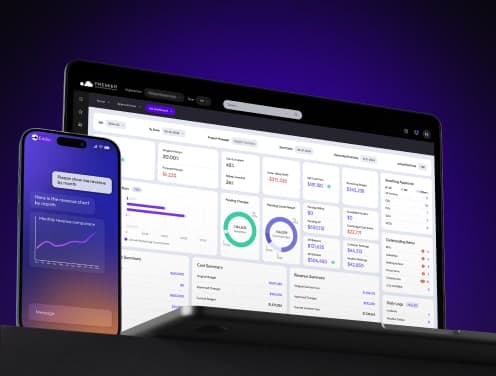
Premier Construction Software construction accounting software is a cloud-based construction management platform that combines accounting, job costing, and project management. Users gave it a 4.6 overall rating, with excellent scores in customer support (4.8) and value for money (4.7).
Premier Construction Software Features
The platform's job costing tools give you immediate budget control and interactive cost reporting. Teams have saved 15-25 hours per week during busy periods by using optimized workflows. The software's drawing management system stores project drawings in PDF format and keeps revision history that enables team collaboration. The mobile app connects field teams with office operations.
Premier Construction Software Pricing
Premier Construction Software comes with three pricing tiers and concurrent user licenses:
Plan | Monthly Cost | Implementation Fee |
Starter | $349/user | $15,000 |
Premium | $299/user | $25,000 |
Enterprise | $249/user | $50,000 |
Each plan comes with mobile app access at $50/user/month. Users get unlimited logins, while concurrent licenses control simultaneous access.
Premier Construction Software Implementation
A 6-week implementation happens through a complete certification program. Setup involves moving data from existing systems using Excel templates for charts of accounts, customer lists, and vendor information. New employees get unlimited training options. The implementation team helps map business processes and create optimized workflows that improve long-term results.
Users love the software's drill-down features to track invoices and audit journals. Construction companies have reduced their workload by a lot, and some teams now work standard hours instead of 10-15 hour workdays.
Sage 300 Construction
Sage 300 Construction and Real Estate (CRE) leads the construction management software market. This complete platform smoothly combines accounting, project management, and estimating into a single system.
Sage 300 Construction Features
The software stands out in job costing by tracking contract amounts, estimates, and construction costs precisely. Teams can monitor labor costs, create accurate bid packages, and handle complex payroll calculations automatically. The platform has over 1,400 prebuilt report formats. Digital plan takeoff support cuts takeoff time by 50% compared to manual methods.
Sage 300 Construction Pricing
Sage 300 CRE's investment structure consists of these key components:
Component | Cost Range |
Software Licenses | $10,000 - $50,000 |
Implementation | $5,000 - $20,000 |
Annual Maintenance | 15-20% of software cost |
Sage 300 Construction Support
Users can get help through multiple channels:
- Phone support at 800-551-8307
- Live chat with customer support analysts
- Online knowledge base with troubleshooting articles
- Sage City community to discuss products and share practices
The platform's specialized training programs help users get the most from their software. Support teams help with payroll, accounts payable, general ledger, and job costing modules. Users can submit their ideas for future software updates through the Ideas site.
QuickBooks Enterprise Construction
QuickBooks Enterprise Construction helps contractors with specialized accounting through its industry-specific edition. The platform has become a top choice for mid-market accounting software and serves over 235,000 companies.
QuickBooks Enterprise Construction Features
The software shines at up-to-the-minute project tracking with advanced job costing tools. Construction businesses get these benefits:
- Proposal templates you can customize for competitive bids
- Progress billing with electronic invoicing
- Built-in calendar that tracks important dates
- Advanced inventory management that prevents negative quantities
The Job Costing Center shows profitability metrics and compares actual costs with budgeted expenses. The platform makes change order management easier through simplified client approval processes.
QuickBooks Enterprise Construction Pricing
QuickBooks Enterprise gives you three subscription options:
Plan | Monthly Cost | Users |
Gold | $175 | 1-40 |
Platinum | $175 | 1-40 |
Diamond | $175 | 1-40 |
Each plan comes with cloud access and supports over 100,000 employees, customers, and vendors. You can add services like QuickBooks Time Elite at $5 per employee monthly.
QuickBooks Enterprise Construction Training
The official QuickBooks certification program costs $599.95. You'll get:
- A complete 240-page manual
- Two-day live training sessions
- Free certification exam ($130 value)
- Post-class support materials
The platform provides training focused on construction accounting needs. You'll learn specialized processes to manage contracts, track costs, and handle progress payments. Most users complete the certification program in 12 hours.
Foundation Software
FOUNDATION has been a specialized accounting solution for construction businesses since 1985. The software received a 4.3-star rating from Forbes Advisor in 2024.
Foundation Software Features
The platform combines standard accounting functions with construction-specific capabilities. The base system has:
Core Modules | Add-on Modules |
Job Costing | Mobile Time Tracking |
Payroll | Service Dispatch |
Purchase Orders | Equipment Management |
Accounts Receivable | Project Management |
The job costing module tracks costs against estimates with user-defined phases and cost codes. The payroll system handles certified payroll, common wage rates, and union compliance.
Foundation Software Pricing
FOUNDATION's pricing adapts to specific business requirements. The cost structure spans from $2,000 to $50,000 for best-of-breed systems. Cloud-based options range from several hundred to thousands of dollars monthly. The pricing varies by:
- Number of users
- Selected modules
- Implementation needs
- Support requirements
Foundation Software Support
The support package lasts six months after setup. Support teams are available Monday through Friday, 8 AM to 8 PM EST. The platform has:
- Complete system training
- Unlimited toll-free phone assistance
- Web knowledge base access
- Regular software updates
The implementation process moves through three phases: planning, training, and wrap-up. The ConversionQuick tool transfers data from previous systems smoothly. Field trainers respond to support requests in less than 45 minutes on average.
CMiC Construction Platform
CMiC stands as an industry innovator, serving 25% of ENR's top 400 contractors. Their Single Database Platform™ connects financial and project operations seamlessly.
CMiC Construction Features
This unified system brings together financial and project management in one place. The financial tools take care of accounting, payroll, and equipment management. The project management suite has:
Core Capabilities | Project Tools |
Bidding & Procurement | Drawing Management |
Project Controls | Resource Planning |
CRM | Inventory Management |
HR & Payroll | Equipment Tracking |
Teams have seen dramatic improvements in productivity and accuracy with immediate data access. Users can securely access the system from any device, anywhere.
CMiC Construction Pricing
The platform's pricing adapts to each company's size and requirements. Studies show the system brings significant returns through:
- Boosted productivity
- Improved accuracy
- Better responsiveness
- Increased profitability
CMiC Construction Implementation
A structured Conference Room Pilot (CRP) approach guides the implementation. The team starts with a complete discovery phase to understand the organization's needs. The essential implementation steps are:
- Data validation and migration
- The core team's participation from different departments
- End-user training programs
- Phased deployment approach
Communication channels stay open throughout the process. Reviews after implementation help spot areas to improve. Users appreciate the platform's effectiveness with complex tasks and specific requirements. The system handles subcontracts, change orders, and external communications exceptionally well.
CrewCost
CrewCost is a modern construction accounting platform built for growing general contractors that need real-time visibility into job costs, WIP, labor, AP, and profitability. Instead of forcing contractors into generic accounting software or complex legacy ERPs, CrewCost combines accounting, job costing, time tracking, and accounts payable in one cloud-based system.
CrewCost Features
CrewCost focuses on construction financial management and helps contractors control costs, protect margins, and reduce manual work. The software excels at:
- Real-time job costing with estimated vs. actual cost tracking
- Work-in-progress (WIP) reporting at the job and company level
- AI-powered accounts payable automation
- Progress billing and retainage management
- Change order and committed cost tracking
- Mobile time tracking connected directly to job budgets
- Vendor compliance and lien waiver tracking
- Procore integration included
The platform gives contractors a clear view of budgets, committed costs, labor, overhead, and profitability, helping teams catch cost issues before they turn into margin problems.
CrewCost Pricing
CrewCost uses annual pricing based on company revenue. Its Builder’s Professional Plan starts at $999/month, paid annually at $11,988/year.
Every license includes unlimited users and projects, onboarding, implementation, and Procore integration, with no setup fees or hidden costs. CrewCost is 100% cloud-based, so teams can access financial data from the office, field, or home without servers or VPNs.
CrewCost Support
CrewCost helps contractors get up and running with included onboarding and guided implementation. Every subscription includes up to around 15 hours of onboarding with a construction accounting specialist, helping teams set up accounts, cost codes, and core workflows.
Support resources include:
- Knowledge base and documentation
- Guided onboarding with a construction accounting specialist
- Implementation included in the subscription
- Cloud-based access for office and field teams
- Product resources covering accounting, AP, job costing, and time tracking
CrewCost is designed to work out of the box without long implementation timelines, custom deployments, or outside consultants. Its cloud-based setup helps teams move faster, reduce double entry, and keep job costing, accounting, time tracking, and AP data connected in one system.
Viewpoint Vista
Vista™, a key component of Trimble Construction One suite, brings together advanced job costing and project management features. This platform centralizes information throughout construction operations.
Viewpoint Vista Features
Job costing serves as the foundation of this software. Users can track budgets, change orders, and project progress in detail. Teams have the flexibility to import information from estimating tools or add job budgets directly. The platform makes service operations smoother by:
- Managing service agreements efficiently
- Simplifying service dispatching
- Providing mobile work order tools
Equipment managers can track locations and monitor usage effectively. The system helps calculate monthly book depreciation and sends preventative maintenance alerts.
Viewpoint Vista Pricing
The pricing reflects Vista's enterprise-level capabilities:
Component | Cost Range |
Licenses | Varies by company size |
Implementation | Several thousand dollars |
Training | Included with implementation |
Viewpoint Vista Integration
The platform works with many third-party vendors. Vista's open database structure gives users complete flexibility to sort and report data. Teams can create custom reports that match their specific needs through Crystal Reports integration.
Job progress, cost information, and detailed breakdowns update automatically. Field teams can access up-to-the-minute data on their mobile devices. This reduces delays between office and construction sites. Teams save time because they don't need to enter the same data multiple times across departments.
Acumatica Construction
Acumatica Construction Edition provides a complete cloud-based ERP solution that makes contractors' operations more efficient. The platform stands out with its user-friendly interface and mobile accessibility.
Acumatica Construction Features
Advanced financial management and specialized construction tools work together in this platform. Note that the system offers:
Core Capabilities | Construction-Specific Tools |
AIA Billing | Project Cost Tracking |
CFMA Benchmarking | Safety Compliance |
Certified Payroll | Bonding Reports |
Financial Management | Project Management |
The software meets modern business needs by automating payroll operations. It reduces human error through integrated tax computations.
Acumatica Construction Pricing
The platform uses a consumption-based pricing model that lines up with business growth. Three key factors determine costs:
- Applications implemented
- Resource consumption levels
- License deployment options
Companies now pay only for the functionality they need, without per-user fees. Users are unlimited, and costs adjust based on actual transaction volumes.
Acumatica Construction Support
Experienced resellers provide evaluation, implementation, and ongoing support. Local partners understand their market and deliver tailored service to each business. The implementation process has:
- Business requirement documentation
- Deployment option analysis
- Team assembly guidance
- Partner-assisted deployment
Technical issues get resolved within a 24-hour window. Partners work with clients throughout the Acumatica lifecycle, from setup through daily operations.
CoConstruct
Construction teams love CoConstruct because it connects budgets, purchase orders, and change orders in one central platform. Users gave the software an impressive 4.7 out of 5 rating, especially when you have excellent customer support (4.8) and value for money (4.6).
CoConstruct Features
Project tracking and client communication make this platform stand out. Teams cut down their work hours through automated workflows that connect timesheets directly to QuickBooks for billing and payroll. The software has:
- Digital signature collection for estimates
- Immediate project schedule updates
- Automated bill scanning
- Customizable selection tools for client choices
CoConstruct Pricing
CoConstruct comes with two distinct pricing tiers:
Plan | Monthly Cost | Features |
Standard | $99 | All features for 2 months |
PLUS™ | $399 | White glove implementation |
Active job sites with client access determine the platform's pricing. Notwithstanding that, users get unlimited storage, projects for estimates, and warranty tracking.
CoConstruct Implementation
The Pro Path system provides a well-laid-out setup process. Teams work with a dedicated implementation coach who guides them through:
- Project setup and customization
- Financial structure configuration
- Schedule template selection
- Trade partner access management
The platform offers comprehensive support resources, though some users mention issues with mobile app functionality. Teams get project templates and schedule frameworks based on NAHB's industry best practices. The process includes unlimited phone and email support.
COINS Construction
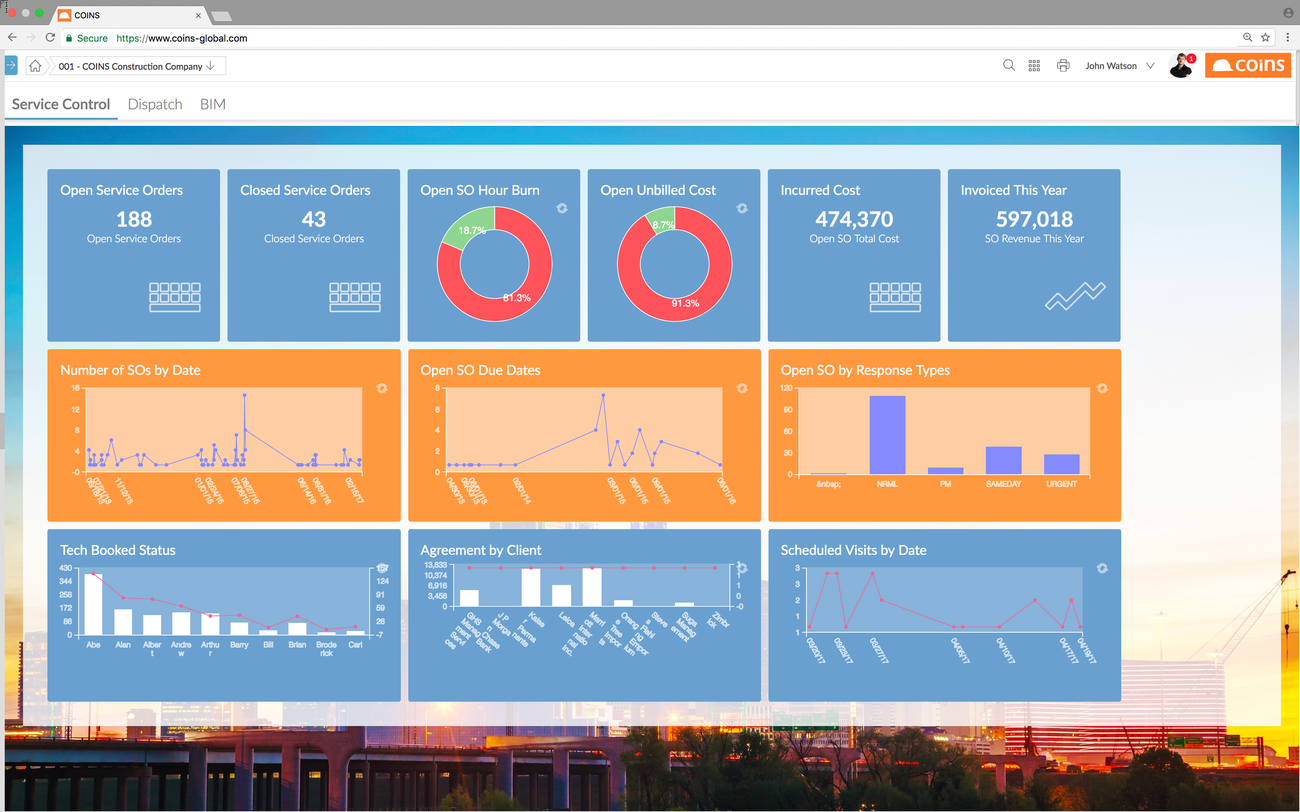
COINS is a unified ERP+ system that connects teams, devices, and business processes on a single platform. The software brings 40 years of construction industry expertise to today's accounting needs.
COINS Construction Features
The platform delivers complete solutions through five main areas:
Core Solutions | Description |
Project Delivery | Up-to-the-minute project tracking |
Finance Operations | Budget management and forecasting |
Time Management | Resource allocation |
Supply Chain | Vendor coordination |
Service Management | Work order processing |
COINS stands out with its Mobile Technician feature. Field staff can capture photos and add equipment issue notes. This helps confirm technical assessments for clients.
COINS Construction Pricing
COINS tailors its pricing structure to match business needs. The platform includes:
- Cloud-based deployment options
- Multiple user access levels
- Flexible payment plans
- No free trial version
COINS Construction Support
Regional experts worldwide run the support system. Teams get:
- Online training modules
- Email assistance
- Phone support
- Special interest group access
A well-laid-out methodology guides the implementation process to tackle leadership, operational change, and technology challenges. Users can then join classroom sessions and workshops designed for both office and field staff. Success Plans complement standard support by providing extra tools and guidance to help businesses grow.
Field teams love how the software handles large groups of project documents. The platform lets users share, comment on, and access project files from anywhere. The search and filter tools make invoice and purchase order tracking simple and efficient.
BuilderTrend
BuilderTrend serves more than 1 million users in over 100 countries with its cloud-based construction management platform. The software helps teams collaborate in real time to manage projects better.
BuilderTrend Features
The platform helps teams control finances and streamline processes. Teams can save hours by automating Excel imports for financial tracking. The software provides:
Core Functions | Business Benefits |
Job Costing | Up-to-the-minute updates |
Payment Processing | Same-day settlements |
Risk Management | Instant onboarding |
Document Storage | Cloud accessibility |
Field teams get automatic alerts as soon as payments go through. The mobile app works with full functionality without needing a browser.
BuilderTrend Pricing
The software keeps pricing simple and clear:
- Standard Plan: $99 monthly for 2-month access
- PLUS™ Plan: $399 monthly with white-glove implementation
Both plans come with unlimited storage and project estimates. Teams report 15-20% savings on change orders for each job.
BuilderTrend Integration
The platform works with more than 20 key business tools. Teams can avoid double data entry through:
- QuickBooks sync for financial records
- Xero integration for accounting
- HubSpot connection for marketing automation
- Salesforce link for CRM functions
API-based integrations help move data smoothly between applications. Teams love how the platform improves communication between accounting and production departments. Field teams generate 21-30 new leads each month using CRM tools.
ComputerEase
Deltek ComputerEase gives contractors specialized construction accounting tools through its cloud-based platform. Users rate the software 4.2 overall.
ComputerEase Features
The platform combines job costing with project management capabilities. The modular system handles:
Core Functions | Advanced Capabilities |
Job Cost Tracking | Mobile Time Entry |
Payroll Processing | Service Management |
Purchase Orders | Equipment Tracking |
Accounts Receivable | Inventory Control |
Field teams can access live data through FieldEase. We used it mainly for timesheet imports and service ticket management.
ComputerEase Pricing
The software costs $500 as a one-time payment. Users pay extra based on:
- Number of users
- Selected modules
- Implementation requirements
- Support package selection
ComputerEase Support
Support teams are available from 8 AM to 8 PM EDT. Users give the customer support 4.1 out of 5 stars. The platform provides:
- Direct chat with support analysts
- Knowledge base access
- Technical assistance
- Cloud hosting support
The implementation process uses ConversionQuick tools for data migration. Training sessions cover both simple software usage and advanced features. Users love the platform's easy-to-use interface. A financial advisor highlighted its excellent work tracking capabilities. The software handles multi-state payroll, widespread wage calculations, and AIA billing effectively.
Conclusion
Construction accounting software has evolved beyond simple bookkeeping tools to become detailed financial management systems. Different platforms provide unique benefits that match various business requirements. Premier Construction Software shines with its up-to-the-minute cost tracking and automated processes. Sage 300 Construction's strength lies in detailed job costing.
CoConstruct and BuilderTrend offer affordable options at $99 monthly, making them perfect for small contractors. Mid-sized companies can benefit from Premier Construction Software, Viewpoint Vista or CrewCost adaptable features. Large enterprises typically prefer Premier Construction Software, CMiC or Procore because of their extensive integration capabilities.
Businesses should consider these key factors when choosing their software:
- Project volume and complexity
- Team size and structure
- Budget constraints
- Required features
- Integration needs
Smart software selection starts with companies assessing their current processes, growth plans, and technology requirements. This careful approach guides them toward better efficiency, accuracy, and profitability. These software solutions help businesses maintain their competitive edge as the construction industry advances in today's digital world.
Latest articles




Trusted by global leaders
Join those who have put their trust in us


