
8 Best Buildertrend Alternatives in 2026
Last updated: April 2026
Quick Answer: Best Buildertrend Alternatives in 2026
Buildertrend costs $399–$1,099/month and tops out at $1,099 for its Complete plan. If you need real accounting, true job costing, or a full construction ERP, Buildertrend was never designed to deliver those. Premier Construction Software is the top alternative for mid-market general contractors who need real-time financial control and project management in one system. For budget-conscious contractors, Contractor Foreman starts at $49/month. For field-heavy teams, Fieldwire is the strongest pick.
Why Contractors Are Looking for Buildertrend Alternatives
Buildertrend's pricing has climbed sharply over the past few years. The Essential plan now starts at $399–$499/month, the Advanced plan runs $699–$799/month, and the Complete plan reaches $999–$1,099/month. Annual contracts lower those rates slightly, but the trajectory is clear. (Projul, 2026)
Beyond price, Buildertrend has real gaps. It was built for residential project management, not financial operations. There's no native construction accounting, no work-in-progress (WIP) reporting, and limited subcontractor financial workflows. Contractors who outgrow basic scheduling and client portals hit a wall.
The global construction industry generated over $12.6 trillion in revenue in 2020, and technology adoption is accelerating. More contractors are demanding platforms that handle both the field and the back office, without requiring three separate subscriptions.
This guide covers the 8 best Buildertrend alternatives in 2026, with verified pricing, honest pros and cons, and clear use-case guidance.
Quick Comparison: Buildertrend Alternatives at a Glance
Software | Type | Starting Price | Best For |
|---|---|---|---|
Premier Construction Software | Construction ERP | $125–$249/user/mo | Mid-market GCs needing full ERP: accounting, PM, and field in one system |
Buildertrend | Construction PM | $399–$1,099/mo flat | Residential builders wanting PM + client portal |
Procore | Construction PM | $375+/mo (ACV-based) | Large GCs managing high-volume commercial work |
ProjectManager | General PM | $14–$26/user/mo | Teams needing Gantt-based scheduling |
Fieldwire | Field Management | $39+/user/mo | Site teams focused on drawings and task tracking |
Buildern | Construction PM | $250–$400/mo | Small GCs wanting estimates-to-invoice workflow |
JobTread | Construction PM | $159/mo base + $16/user | Small remodelers and specialty contractors |
Contractor Foreman | Construction PM | $49–$249/mo | Budget-conscious contractors needing solid basics |
Smartsheet | General Work Mgmt | $9–$19/user/mo | Teams comfortable with spreadsheet-style project views |
1. Premier Construction Software
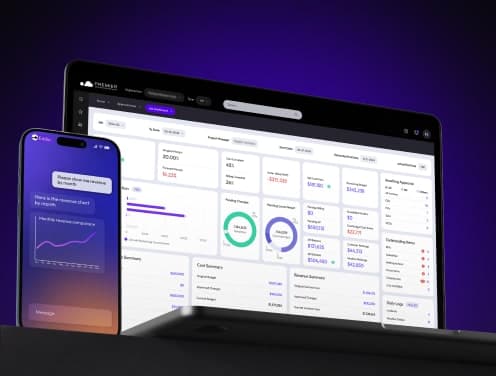
Premier Construction Software is a modern construction ERP built specifically for growing general contractors. It replaces the disconnected stack of accounting software, spreadsheets, and project tools with one system that connects job costing, WIP reporting, change orders, field management, and subcontractor billing in real time.
It holds the Forbes Advisor #1 Construction Cloud ERP award for 2026, a Capterra Best Value 2026 badge, and is backed by Constellation Software, a $68B USD publicly traded company with 125,000+ customers across 100+ countries.
With 800+ customers, 15,000+ users, and 1,000+ verified reviews across G2, Capterra, and Software Advice, Premier Construction Software is one of the most reviewed construction ERPs in North America.
"We can pull reports in real time, drill down into costs, and see exactly what's happening." — Nancy Ocampo, Sr. Accountant, Legacy Construction
Key Features
Job Dashboard and WIP Reporting. The job dashboard gives a full project health overview in one view. WIP reports generate in 2 clicks, no manual spreadsheet assembly required.
AI-Powered Intelligence. Eddie, Premier Construction Software's AI assistant, surfaces red flags and forecasts project outcomes before problems hit the bottom line.
Subcontractor Portal. Subs submit invoices in 45 seconds. Pay apps queue automatically into accounts payable.
Drawing Management (Cortex). Store, version, mark up, and share drawings from any device.
Field Tools. Mobile time entry, daily logs, expense receipts, and RFI tracking, all feeding directly into the financial system.
Workflow Automation. Approval workflows with document visibility, so reviewers see exactly what they're approving.
OData Integration. Real-time modeling and analysis, directly from Premier Construction Software into your reporting tools.
Pros and Cons
Pros • Real-time job costing with drill-down to transaction level • WIP report in 2 clicks, no manual Excel work • Implementation in as few as 60 days • White-glove setup by construction-focused CPAs and PMs • 30-day full money-back guarantee • 540 product enhancements per year driven by customer feedback • Scales from $5M to $500M+ in revenue | Cons • Higher starting implementation investment than PM-only tools • Learning curve for PMs unfamiliar with accounting workflows • Not the right fit for contractors under $5M revenue |
Pricing
Plan | Monthly Cost (per concurrent user) | Implementation Fee |
|---|---|---|
Starter | $249/user/mo | From $15,000 |
Premium | $149/user/mo | From $25,000 |
Enterprise | $125/user/mo | From $50,000 |
The mobile app is available at $50/user/month. All plans include unlimited training, a dedicated account manager, and data migration support. Implementation takes as few as 60 days.
Best Use Case
General contractors, land developers, and design-build firms with $5M–$500M+ in annual revenue who need one system to run accounting, project management, and field operations. Companies running disconnected tools (QuickBooks + Procore + Excel) are Premier Construction Software's most common switching profile.
"Since adopting Premier Construction Software over a decade ago, we have grown our revenue by 30x." — Eric Engelke, Engelke Construction Solutions
"I went from billing 40 hours a week down to 8 hours on a Saturday. And I'm capturing more costs. My profit went from 3% to 8%." — Mark Marshall, Owner, JM Construction
2. ProjectManager
ProjectManager is a cloud-based project management platform with strong Gantt chart and resource tracking capabilities. It earns a 4.4/5 on G2 and a 4.1/5 on Capterra. It serves construction teams alongside its broader professional services audience.
Key Features
Interactive Gantt Charts. Link all four dependency types, set baselines, and track planned versus actual progress in real time.
Resource Workload Management. Color-coded workload charts show allocation across team members, flagging over-assignment before it causes delays.
Multiple Project Views. Gantt, Kanban, list, calendar, and sheet views, all sharing the same live data.
Mobile App. Available on iOS and Android for field time entry and task updates.
Pros and Cons
Pros • 30-day free trial • Unlimited file storage • Multiple simultaneous project views • Strong time and cost tracking | Cons • No construction-native accounting • Limited native integrations • No free plan • Steeper learning curve at advanced features |
Pricing
Plan | Annual Billing | Monthly Billing | Key Limits |
|---|---|---|---|
Team | $14/user/mo | $17/user/mo | Up to 20 projects, 5GB storage |
Business | $26/user/mo | $30/user/mo | Up to 100 projects, 25GB storage |
Enterprise | Custom | Custom | Unlimited projects and storage |
Best Use Case
Construction teams that need structured project scheduling with resource visibility. ProjectManager works well for GCs managing multiple jobs who want Gantt-based oversight without investing in a full construction ERP. It is not a Buildertrend alternative for accounting or financial management.
3. Procore
Procore is the dominant enterprise construction management platform worldwide. It connects preconstruction, project execution, resource management, and financial management across four product lines. However, it is a project management platform, not a construction ERP. Native accounting requires integration with a separate system.
Procore's pricing is volume-based and opaque. Small contractors ($10–50M annual construction volume) typically pay $15,000–$30,000/year. Mid-size firms ($50–200M) report $30,000–$80,000/year. Large enterprises pay $80,000 to $600,000+ annually. (Projul Procore Pricing Analysis, 2026)
Key Features
Unlimited Users. Every Procore contract includes unlimited user access at no extra cost per seat.
BIM and Design Coordination. Full 3D model coordination and design review workflows.
300+ Integrations. Connects to most major construction accounting and ERP systems.
Quality and Safety. Inspection checklists, incident tracking, and compliance documentation.
Pros and Cons
Pros • Unlimited users and data storage • 24/7 support with 90% customer satisfaction rate • Strongest third-party integration library in the category • Teams using Procore handle 48% more volume per person | Cons • No native accounting or ERP functionality • Pricing is opaque and scales aggressively with revenue • Overkill for smaller operations • Implementation complexity is high |
Pricing
Procore does not publish standard pricing. Quotes are based on Annual Construction Volume (ACV). Entry-level floor is approximately $375/month, but most contractors doing meaningful volume pay $10,000–$60,000+/year. (OneCrew, 2026)
Best Use Case
Large GCs managing high-volume commercial projects with complex subcontractor networks and multiple stakeholder groups. Procore makes sense when unlimited user access and deep BIM integration outweigh the cost. Smaller contractors typically find better value elsewhere.
4. Fieldwire
Fieldwire is a mobile-first jobsite management platform used at more than 2,000,000 construction sites worldwide. It earns a 4.6/5 rating and specializes in blueprint management, task tracking, and field-to-office communication. It does not include accounting or financial management.
Key Features
Blueprint and Drawing Management. View, annotate, and share drawings from any device. Version control alerts teams when plans update, preventing errors from outdated sheets.
Location-Pinned Tasks. Link tasks directly to plan locations for precise accountability.
Digitized Forms. Daily reports, safety audits, inspection checklists, and RFIs, all paperless.
Offline Functionality. Field teams work without connection; data syncs automatically when back online.
Pros and Cons
Pros • Superior drawing management rated 4.5/5 • Strong offline mobile performance • Saves up to 2–3 QA/QC headcount per project • Accessible interface for field crews | Cons • No financial or accounting layer • Mobile/desktop sync can lag on large projects • Plan exports can be challenging • Limited customization |
Pricing
Fieldwire's paid plans start at $39/user/month (annual billing). All paid plans include unlimited projects and sheets. Higher tiers add custom forms, exports, and financial management tools. (The Digital Project Manager, 2026)
Best Use Case
General contractors, specialty contractors, and property owners who need strong field management tools without a full ERP. Fieldwire is the clearest pick when drawing management and real-time field communication are the primary requirements.
5. Buildern
Buildern is a cloud-based construction management platform built for small to mid-sized contractors. It connects estimates, schedules, client portals, and subcontractor workflows in one place. It earns solid marks for ease of use and affordability.
Key Features
Takeoff-to-Estimate. Upload plans, measure quantities in the software, and convert results into estimates automatically.
Financial Tracking. Custom cost catalogs, QuickBooks and Xero integrations, and change order management.
Client and Subcontractor Portals. Clients view approved documents. Subs submit RFIs and track their assignments.
Scheduling. Milestone tracking and task dependencies keep projects on schedule.
Buildern reports that companies on its platform complete projects 20% faster, with 15% fewer delays and 10% higher profit margins.
Pros and Cons
Pros • 7-day free trial, no credit card required • Unlimited free access for clients, vendors, and field workers • Takeoff-to-estimate workflow saves hours per bid • Transparent per-user pricing model | Cons • Mobile app has reported bug issues • Less feature depth than enterprise platforms • Device syncing can be slow • Limited scalability for large GCs |
Pricing
Plan | Monthly Cost | Paid Users Included | Additional Users |
|---|---|---|---|
Starter | $250/mo | 2 users | $90/user/mo |
Professional | $400/mo | 4 users | $100/user/mo |
Enterprise | Custom | 30+ users | Custom |
Best Use Case
Small and mid-sized GCs who want an integrated path from estimation through invoicing, at a lower entry price than full ERPs. Buildern handles the basics well. It does not replace a construction ERP for companies with complex financial reporting needs.
6. JobTread
JobTread earns a 4.9/5 rating across review platforms, making it one of the highest-rated construction management tools available. Its budget-first approach and all-features-in-every-plan pricing model are particularly attractive to small contractors and remodelers.
Key Features
Budget-First Project Management. Every project starts from a budget, creating financial accountability from day one.
Cost Catalog. Organize materials, labor rates, and subcontractor fees for faster, more consistent estimating.
Sales and Estimating. Templates, smart calculations, and automated pricing reduce bid preparation time.
Mobile Accessibility. Full feature access on iOS and Android.
Pros and Cons
Pros • Highest user rating among options in this guide • All features available on every plan, no gating • Setup typically takes 1 week to 1 month • Free implementation, training, and support included • Unlimited free access for vendors, subs, and clients | Cons • Financial tracking less deep than full ERPs • QuickBooks integration has received mixed feedback • Data migration challenges reported by some users • Task visibility issues flagged by a subset of reviewers |
Pricing
Component | Monthly Billing | Annual Billing (20% savings) |
|---|---|---|
Base Subscription | $199/mo | $159/mo |
Internal Users | $20/user/mo | $16/user/mo |
Vendors, subcontractors, and customers get unlimited free access. All plans include a 30-day money-back guarantee.
Best Use Case
Home builders, remodelers, and specialty contractors with smaller teams who want a structured, budget-driven workflow without the cost or complexity of a full ERP. JobTread's customer satisfaction scores are hard to beat at this price point.
7. Contractor Foreman
Contractor Foreman is one of the most affordable all-in-one construction management platforms available. It earns a 4.5/5 overall rating, with a 4.6/5 for value for money. The $49/month entry point with unlimited projects is genuinely rare in this category.
Key Features
GPS-Tracked Timecards and Crew Scheduling. Accurate time tracking with location data for payroll and labor cost reporting.
Gantt (CPM) Scheduling. Critical path scheduling with daily logs and milestone tracking.
Permit and Inspection Tracking. Centralized system for managing compliance documentation across projects.
Client Portal. Transparent project communication with clients throughout the build.
100+ Pre-Built Reports. Financial dashboards with drill-down capabilities, plus custom forms and checklists.
Pros and Cons
Pros • Strongest price-to-feature ratio at this price point • QuickBooks Online and Desktop integration • Unlimited projects on all plans • 30-day free trial; 100-day money-back on higher tiers • Free training and support included | Cons • Mobile app performance issues reported • Fewer third-party integrations than Procore • Initial learning curve due to feature volume • Some module sync issues flagged by users |
Pricing
Plan | Monthly Cost | Users Included |
|---|---|---|
Basic | $49/mo | 1 user |
Standard | $79/mo | 3 users |
Plus | $125/mo | 8 users |
Pro | $166/mo | 15 users |
Unlimited | $249/mo | Unlimited |
Best Use Case
Small to mid-sized general and trade contractors who need solid project management, time tracking, and financial dashboards at a predictable, low monthly cost. Contractor Foreman is the budget leader in this comparison. It does not replace a construction ERP for companies with complex WIP or multi-entity accounting requirements.
8. Smartsheet
Smartsheet is a general-purpose work management platform with a spreadsheet-style interface. More than 33,000 construction companies use it for project tracking, resource management, and team coordination. It is not construction-native, but its flexibility and low per-user pricing make it a common choice for cross-functional teams.
Key Features
Multiple Project Views. Grid, Gantt, card, and calendar views, all sharing live data.
Workflow Automation. Reduce manual follow-up with rule-based automations and approval routing.
Resource Management. Allocate field workers, equipment, and materials with visibility across projects.
Integrations. Connects to Procore, Egnyte, DocuSign, Microsoft 365, and Google Workspace.
Pros and Cons
Pros • Familiar spreadsheet interface reduces onboarding friction • Strong automation for repetitive approval workflows • Handles complex cross-team coordination well • Low per-user entry price | Cons • Not built for construction, no job costing or WIP • Manual syncing required for some interactive spreadsheet changes • Access sharing is complex at scale • Setup time is higher than it appears |
Pricing
Plan | Annual Billing | Key Notes |
|---|---|---|
Pro | $9/user/mo | 1–10 members, 250 automations/month |
Business | $19/user/mo | 3+ members, unlimited automations and guests |
Enterprise | Custom | 10+ members, custom configuration |
Best Use Case
Construction companies with cross-functional teams who are comfortable with spreadsheet-based workflows and need flexible project tracking without investing in a full construction ERP. Smartsheet works well as a supplementary coordination layer but is not a like-for-like Buildertrend replacement for construction PM.
Final Comparison: All 8 Alternatives Side by Side
Software | Best For | Starting Price | Key Features | Rating | Verdict |
|---|---|---|---|---|---|
Premier Construction Software | Growing GCs who need real-time job costing and financial control | $125–$249/user/mo | • Real-time job dashboard • WIP in 2 clicks • AI-powered forecasting (Eddie) • Subcontractor portal • Drawing management (Cortex) • Implementation in 60 days | 4.7 / 5 | Best full ERP for mid-market GCs |
Buildertrend | Residential builders wanting PM + client portal | $399–$1,099/mo flat | • Client portal • Scheduling • Basic CRM • Change orders (Advanced+) • QuickBooks integration | 4.3 / 5 | PM-focused; weak on financials |
Procore | Large GCs with complex, high-volume commercial projects | $375+/mo (ACV model) | • Unlimited users • BIM & design coordination • Quality & safety • Financial management • 300+ integrations | 4.5 / 5 | Enterprise PM; no native accounting |
ProjectManager | Teams prioritizing Gantt scheduling and resource tracking | $14–$26/user/mo | • Interactive Gantt charts • Resource workload charts • Multiple project views • 30-day free trial | 4.1 / 5 | Solid PM basics; not construction-native |
Fieldwire | Site teams managing drawings, RFIs, and safety tasks | $39+/user/mo | • Blueprint versioning • Location-pinned tasks • Offline mobile access • Safety documentation | 4.6 / 5 | Best field tool; no financial layer |
Buildern | Small GCs wanting one platform from estimates to invoice | $250–$400/mo | • Takeoff-to-estimate • QuickBooks & Xero sync • Client & sub portals • 7-day free trial | 4.4 / 5 | Good SMB fit; limited scalability |
JobTread | Small remodelers and specialty contractors | $159/mo + $16/user | • Budget-first approach • Cost catalog • All features in every plan • Quick 1-week setup | 4.9 / 5 | Highest-rated; feature depth grows fast |
Contractor Foreman | Budget-conscious contractors needing PM essentials | $49–$249/mo | • GPS timecards • Gantt scheduling • Unlimited projects • 30-day free trial | 4.5 / 5 | Best price-to-feature ratio under $250 |
Smartsheet | Cross-functional teams comfortable with spreadsheet-style views | $9–$19/user/mo | • Grid/Gantt/Calendar/Card views • Workflow automation • Procore & DocuSign integrations • 33,000+ construction users | 4.4 / 5 | Flexible; not built for construction |
How to Choose the Right Buildertrend Alternative
The right platform depends on what Buildertrend is actually failing to do for your business. Here are the key decision criteria:
• You need real accounting and job costing. Premier Construction Software is the answer. It's the only full construction ERP in this list.
• You need enterprise-scale PM with unlimited users. Procore is the strongest option, if budget allows.
• Your teams live on the jobsite and need mobile drawing management. Fieldwire is purpose-built for that use case.
• You want the best ratings and all-features access at a low price. JobTread is hard to beat.
• You need solid basics at the lowest possible monthly cost. Contractor Foreman at $49/month is the entry-level leader.
• You manage multiple construction projects with spreadsheet-style views. Smartsheet handles cross-functional coordination well.
Most platforms in this guide offer free trials or demos. Buildertrend offers neither. That alone is worth factoring into your evaluation.
Software transitions require planning, but the payoff is real. Contractors who switch to the right platform report faster close cycles, fewer billing errors, and better margin visibility from the day they go live.
See why 800+ contractors run their business on Premier Construction Software.
Book a free demo at premiercs.com. No commitment. 30-day money-back guarantee.
Latest articles




Trusted by global leaders
Join those who have put their trust in us